When pricing a print job, color is one of the biggest cost drivers.
Many people assume pricing is based only on size and quantity. In reality, the number and type of ink colors used can significantly affect the final price, sometimes more than paper choice.
Understanding how color works in offset printing can help you visualize your project in cost-saving ways without sacrificing your impact.
In Offset Printing, Each Ink Color Matters
Offset printing uses a distinct unit for each separate ink chosen.
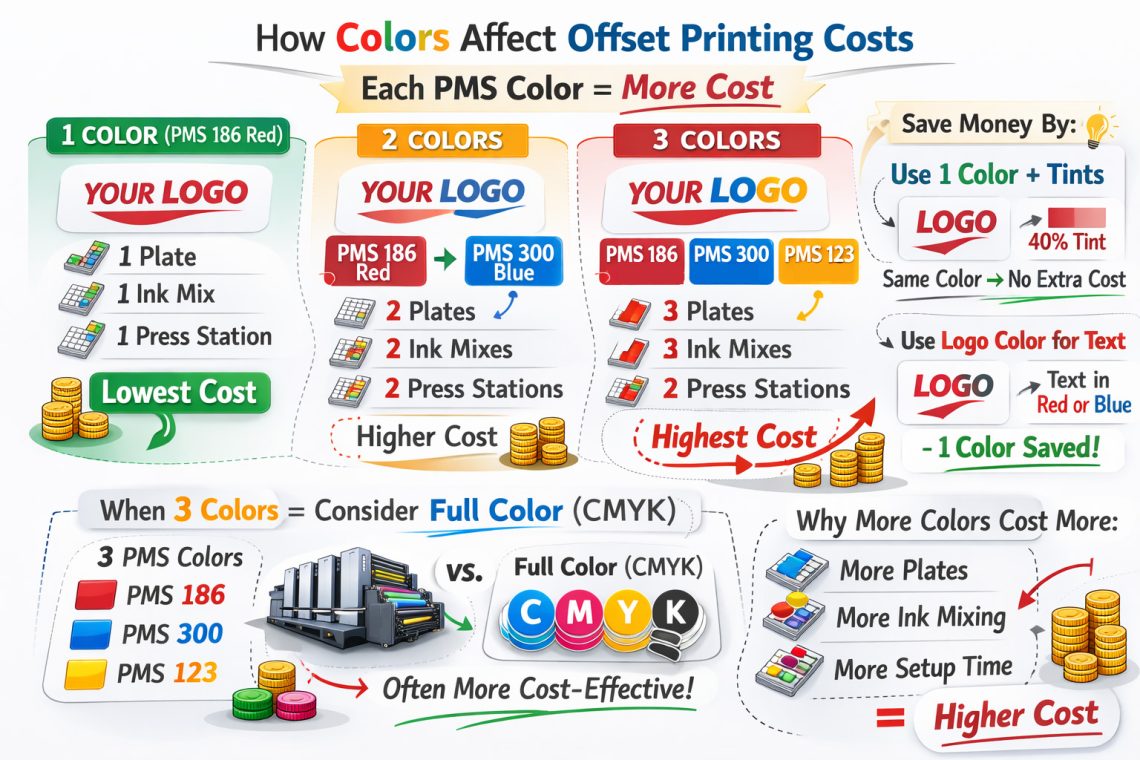
Each spot color (PMS color) requires:
- Its own printing plate
- Its own ink mix
- Its own ink fountain loaded on press
- Additional setup and wash-up time
That means every new ink color adds labor, materials, and press time.
More colors = more cost.
Example: Two Ink Colors vs. One Ink Shade
Let’s say your logo uses:
- PMS 186 Red
- PMS 300 Blue
That’s a 2-color job. The press must be loaded with two separate custom inks.
But what if your design could use:
- PMS 186 Red
- A 40% screen (tint) of PMS 186
Now you still have visual variation but you’re now technically printing only one ink color.
Because the lighter shade is just a screened version of the same ink, the press does not need:
- A second plate
- A second custom ink mix
- A second press station
That keeps the job priced as one color instead of two, often cutting color costs nearly in half.
Why Adding a PMS Color Costs More
Each additional PMS color requires:
- Custom ink mixing
- Press cleaning between jobs
- Another plate
- Additional setup calibration
- More production time
Even if the second color is used sparingly, it still requires full setup at press.
Smart Cost-Saving Strategy: Use One Logo Color for Text
Another way to reduce cost?
Use one of your logo’s existing colors for body text or headlines.
For example:
Instead of:
- PMS 186 (logo red)
- PMS 300 (logo blue)
- Black (for text)
You could use:
- PMS 186
- PMS 300
And set the text in one of those colors.
By eliminating black as a separate ink, you reduce the job from 3 colors to 2 colors.
That removes:
- One plate
- One ink mix
- One press station
- Additional setup time
Small design adjustments like this can create meaningful savings on large print runs.
When Three PMS Colors May Not Make Sense
Here’s where strategy becomes important.
If your design uses:
- PMS 186
- PMS 300
- PMS 123
You have a 3-color job.
At that point, it may actually make more financial sense to print in full color (CMYK) instead.
Full color offset printing uses:
- Cyan
- Magenta
- Yellow
- Black
Those four inks are standard process colors and in many cases, pricing for 4-color process can be competitive with (or even lower than) 3 distinct PMS colors.
Especially when:
- Gradients are involved
- Photos are used
- Complex artwork is present
Sometimes going full color simplifies production.
Spot Color vs. Process Color: Know the Difference
Spot (PMS) colors
- Custom-mixed inks
- Highly accurate color matching
- Each color adds cost
Process (CMYK)
- Built from four standard inks
- Ideal for photos and gradients
- Often cheaper than multi-color jobs